
Working harder in 2026 is an outdated game. Between shifting project deadlines, endless email threads, and context-switching across a dozen SaaS tabs, brute-forcing your daily tasks leads straight to burnout. The real productivity multiplier today isn’t speed—it’s building automated AI workflow loops that eliminate repetitive cognitive friction.
Whether you are a remote professional, a solo creator, or managing a dynamic product team, the modern AI ecosystem has matured far beyond simple chatbot prompts. We now have dedicated reasoning engines, connected knowledge bases, and zero-code automation bridges that talk to each other seamlessly.
In this comprehensive guide, we test and break down the top 5 AI workflow tools in 2026, complete with practical implementation recipes, pricing realities, and how to combine them into an effortless 3-tier productivity stack.
Quick Summary: The 2026 AI Productivity Matrix
1. Claude 3.5 Sonnet
Free / $20/mo
Primary Strength: Complex Reasoning & Clean Code
Best For: Deep writing, analytical strategy, coding
2. Notion AI
$10/user/mo
Primary Strength: Connected Workspace Intelligence
Best For: Meeting summaries, connected wikis & SOPs
3. Perplexity AI
Free / $20/mo
Primary Strength: Source-Backed Real-Time Research
Best For: Fact-checking, market & academic research
4. Zapier AI / Make
Free tier / $19.99/mo
Primary Strength: Cross-App Autonomous Pipelines
Best For: Lead capture, auto-filing, content repurposing
5. ChatGPT Plus
Free / $20/mo
Primary Strength: Multi-Modal Data & Custom GPTs
Best For: Data analysis, custom team agents, vision
1. Claude 3.5 Sonnet: The Deep Work & Logic Powerhouse
While general chatbots produce surface-level drafts, Anthropic’s Claude 3.5 models (specifically Sonnet and Opus) have become the undisputed standard for professionals demanding logical depth, nuanced tone, and clean code generation.
What sets Claude apart in a daily workflow is Artifacts—a dedicated interactive sidebar that compiles documents, code snippets, visual SVGs, and landing page wireframes alongside your chat. Instead of scrolling through walls of markdown, your deliverables are rendered live, ready to be copied or iterated upon.
Practical Workflow Recipe: The 15-Minute Client Brief
- Step 1: Dump unstructured meeting notes, customer transcripts, or bullet points directly into Claude.
- Step 2: Use the prompt: “Synthesize these raw notes into an executive one-pager with three clear sections: Strategic Objectives, Core Obstacles, and Immediate Milestones. Use an active, confident tone.”
- Step 3: Open the generated Artifact, tweak the bullet points, and export directly as Markdown or HTML.
Verdict: Best for high-stakes writing, coding tasks, and analytical strategy where hallucinations cannot be tolerated.
2. Notion AI: Your Central Autonomous Second Brain
AI that sits outside your workspace requires copy-pasting back and forth. Notion AI solves this by embedding contextual intelligence directly where your project databases, wikis, and sprint trackers already live.
With its recent Q&A Across Workspace update, Notion AI can search through thousands of interconnected pages, meeting notes, and SOPs to answer specific team queries: “What did we agree on regarding the Q4 hosting budget in last week’s sync?” Within seconds, it cites the exact meeting doc and attendees.
Key Productivity Features:
- Automated Database Properties: Auto-generate executive summaries, action item checklists, and priority tags whenever a new document is added.
- Contextual Writing Assistant: Highlight any paragraph to change tone, translate into 14 languages, or expand on technical points without leaving your workspace.
- Voice Note Transcripts: Record voice memos on mobile and have Notion AI organize them into structured task boards.
Verdict: An indispensable upgrade for individuals and teams already organized inside Notion.
3. Perplexity AI: The Zero-BS Research Companion
Standard search engine results in 2026 are increasingly cluttered with sponsored ads and SEO-bloated listicles. Perplexity AI acts as an intelligent answer engine that combines state-of-the-art LLMs with real-time web indexing, returning concise, source-cited executive summaries.
Instead of opening 15 browser tabs to compare software specs or market metrics, Perplexity synthesizes key data points into structured bullet points with clickable footnote citations.
Pro Tip: Leveraging Search Focus Modes
- Academic Focus: Searches arXiv, PubMed, and peer-reviewed papers for vetted scientific evidence.
- Writing Focus: Operates as a pure generative writer without web browsing distraction.
- Wolfram|Alpha / Math Focus: Executes precise computational algorithms and financial models.
Verdict: Replaces 80% of routine web searches, saving an estimated 4 to 6 hours of research time each week.
4. Zapier AI & Make.com: The Autonomous Pipeline Glue
Having brilliant AI models is meaningless if data remains siloed. Zapier AI and Make.com serve as the central nervous system connecting your tools into hands-free automation loops.
Rather than building fragile multi-step conditional rules by hand, Zapier’s natural language workflow builder allows you to describe outcomes: “When a new lead fills out my Typeform, analyze their budget with AI, categorize their company tier, create a row in Notion, and ping the sales team in Slack if budget > $5,000.”
High-Impact Workflow Recipe: Autonomous Content Repurposing
- Trigger: New published post on your WordPress or Substack blog.
- AI Step: Claude/OpenAI parses the core takeaways into a punchy 5-tweet thread and a LinkedIn thought-leadership post.
- Action: Saves drafts directly into Buffer or Notion for 1-click human review.
Verdict: The single highest-leverage investment for solopreneurs looking to scale operations without hiring extra staff.
5. ChatGPT Plus: The Versatile Multi-Modal Swiss Army Knife
OpenAI’s ChatGPT Plus remains the most versatile foundational assistant on the market. With Advanced Voice Mode, Vision processing, and Advanced Data Analysis (Python sandbox), it excels at handling ambiguous, multi-format daily tasks.
Snap a photo of your messy whiteboard brainstorm, upload a raw 50,000-row CSV file, or ask it to visualize customer churn trends—ChatGPT handles data manipulation with clean interactive charts in seconds.
Workflow Highlight: Custom GPTs
By creating private Custom GPTs tailored with your brand voice guidelines, product documentation, and email templates, you can build specialized mini-agents for customer support triage or ad copy generation.
Verdict: The universal baseline subscription that every digital professional should master first.
How to Build Your 30-Minute Minimalist AI Stack
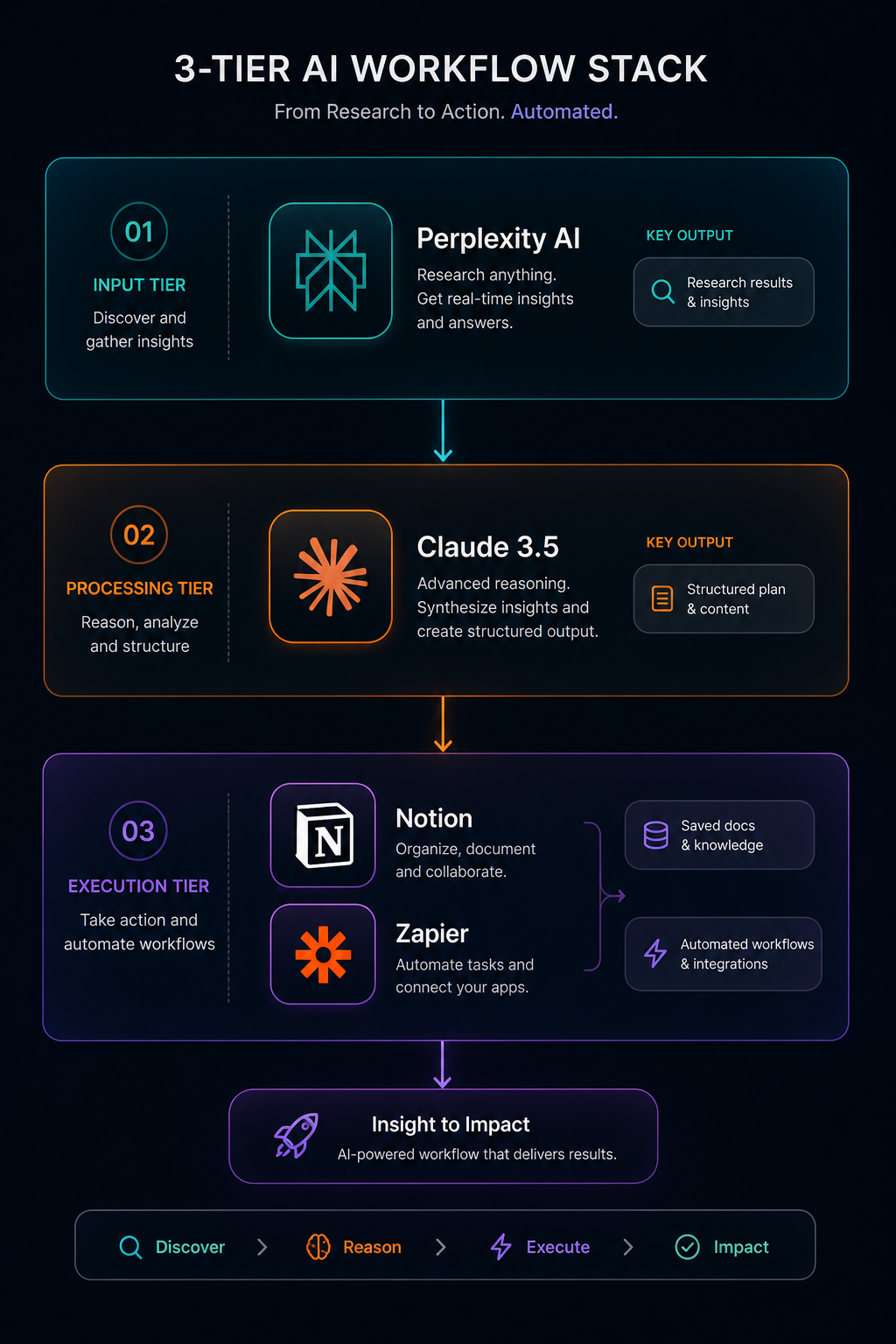
You don’t need a dozen subscriptions. The most productive operators build a tight, 3-tier modular stack:
- Input Tier (Information Gathering): Use Perplexity AI for fast, cited research and market intelligence.
- Processing Tier (Deep Thinking & Creation): Use Claude 3.5 for drafting comprehensive articles, refining code, and strategic structuring.
- Execution Tier (Storage & Distribution): Store final outputs in Notion, connected to Zapier for automated multi-channel delivery.
Frequently Asked Questions (FAQ)
Will these AI tools use my proprietary business data for training?
Most paid professional tiers (Claude Pro/Team, ChatGPT Team/Enterprise, Notion AI) explicitly provide data privacy commitments ensuring your proprietary prompts and uploaded files are not used to train public foundational models. Always verify data privacy toggles in your account settings.
What is the recommended budget for an AI productivity setup?
For a solo professional, $20 to $40 per month (e.g., Claude Pro + Notion AI or ChatGPT Plus) delivers an estimated 10x return on investment by reclaiming 15 to 20 hours of manual work every month.
Looking to optimize your modern remote workspace? Explore our latest curated reviews on ergonomic productivity gear and smart desk setups at NextWorkflowLab.